
I've watched a lot of HubSpot implementations over the years. Some brilliant. Some disasters. But nothing prepared me for what I've seen with Breeze Agents.
The pattern is consistent: Teams get excited. They rush the setup. They skip the boring parts. And three months later, they're wondering why their AI agent sounds like a confused intern who just started yesterday.
Here's what nobody tells you: The demo is a lie.
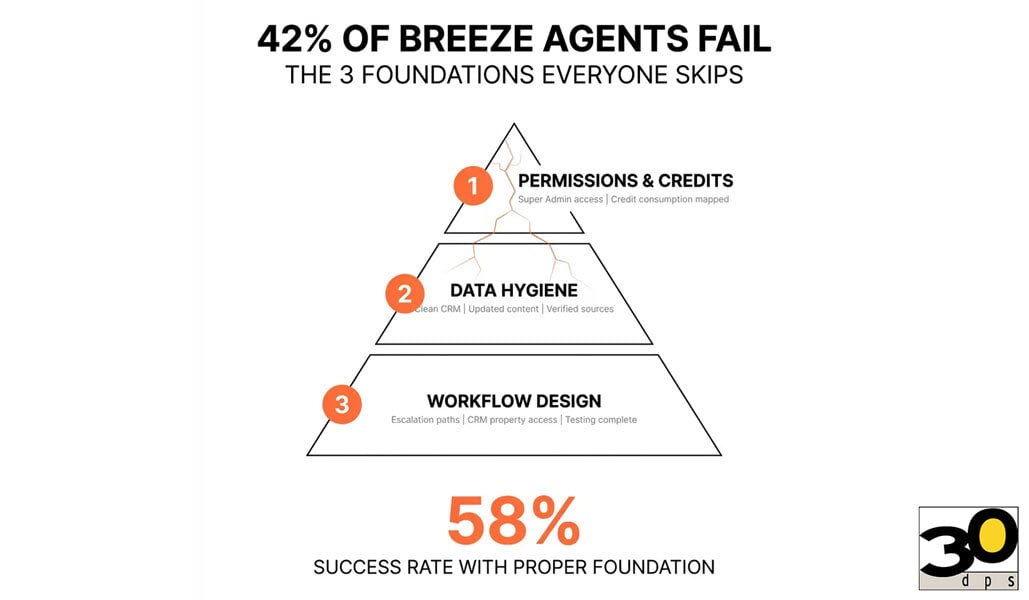
Not intentionally. HubSpot's demos show you what's possible with clean data, proper configuration, and a team that knows what they're doing. What they don't show you is the 42% failure rate when you skip the foundation work.
I'm going to walk you through what actually matters when setting up Breeze Agents. Not the marketing pitch. The real work that separates successful implementations from expensive experiments.
The Prerequisites Everyone Skips
Let me start with something that sounds obvious but trips up most teams: You need actual permissions to make this work.
A Super Admin has to toggle on specific AI Settings switches. One of them is literally called "Give users access to generative AI tools and features." Sounds basic, right? But I've seen three-week delays because nobody checked if this switch was flipped.
Users need either Super Admin access or specific agent permissions. Not "close enough" permissions. Not "we'll figure it out later" permissions. The actual ones.
Here's where it gets interesting: Breeze Agents consume HubSpot Credits for operation. Starting September 3, 2025, the Prospecting Agent eats credits per action. Most teams discover this cost implication after implementation, not during planning.
That's backwards.
The Customer Agent has its own quirks. You need at least one Facebook, WhatsApp, or live chat channel created and connected to your conversations inbox or help desk workspace before you can even create the agent. No channel? No agent. It's that simple.
Why Your Data Hygiene Determines Everything
This is where implementations live or die.
HubSpot explicitly warns you to "avoid sharing any sensitive information in your enabled data inputs for AI features, including your prompts." Yet data governance remains the most overlooked prerequisite in implementations.
Think about what that means. Your agent learns from your data. If your data is messy, your agent is messy. If your data is incomplete, your agent gives incomplete answers. If your data is outdated, your agent gives outdated answers.
Garbage in, garbage out. Except now the garbage talks to your customers.
The Prospecting Agent automatically summarizes your products and services based on your website. Right now. Whatever's on there. If your website still mentions that product you discontinued six months ago, guess what your agent is going to pitch?
I've seen this happen. A manufacturing client had outdated specifications on their site. Their Prospecting Agent quoted specs that hadn't been accurate since 2022. They didn't catch it until a prospect called asking about features that no longer existed.
Breeze automatically detects page content and suggests three relevant questions based on synced content. But if no page-specific content has been synced, it displays only generic prompts. Your agent becomes that person at a party who gives the same three responses regardless of what you ask them.
Here's what you need to do before you even think about launching:
-
Audit every piece of content your agent can access
-
Update product descriptions, service offerings, and pricing
-
Remove deprecated information from your knowledge base
-
Verify your website accurately reflects current offerings
-
Clean your CRM data (yes, all of it)
-
Document what data sources your agent should use
-
Establish who reviews and approves agent training materials
This takes time. Weeks, not hours. But HubSpot customers report that properly configured Breeze Customer Agents resolve over 50% of support tickets and reduce ticket closure time by nearly 40%.
That ROI only happens when the foundation is solid.
The Workflow Design Principles That Actually Matter
Most teams treat agent deployment as "the end." It's actually the beginning.
HubSpot's pre-built agents have default inputs, instructions, and tools that you can't edit or rearrange. If an agent's configuration relies on HubSpot features a user doesn't have access to, the agent can't run. Even with edit permissions.
This creates a weird situation where the agent exists but doesn't work for half your team.
You need to understand the difference between assistants and agents. Assistants focus on delivering information conversationally. Agents follow defined steps to complete tasks. Assistants prioritize speed. Agents take longer because of task complexity.
Mixing these paradigms causes confusion. I've seen teams try to make an assistant act like an agent, then wonder why it can't complete multi-step processes. Or they deploy an agent for simple questions, then complain it's too slow.
Use the right tool for the job.
Breeze Agents can update CRM properties based on customer-provided information. But you have to explicitly grant agents access to specific properties. This is an often-overlooked configuration step that causes agents to collect information they can't actually use.
Imagine asking customers for their company size, industry, and pain points, then realizing your agent can't write any of that to your CRM. You're collecting data into a black hole.
The Customer Agent escalates to humans when confidence levels are low. But if the agent is "still unable to answer the query, it'll reassign the conversation to a human agent." That requires proper escalation workflows.
Most teams forget to configure these workflows. The agent tries to escalate, fails, and the customer sits in limbo wondering if anyone is actually going to help them.
Here's your workflow design checklist:
-
Map out every step the agent needs to complete
-
Identify decision points where the agent needs to choose paths
-
Define clear escalation triggers and processes
-
Configure CRM property access before launch
-
Test every workflow path (including failure scenarios)
-
Document what happens when the agent can't complete a task
-
Create backup processes for when systems are down
The standard enterprise chatbot timeline is minimum one month if you're expediting. Anything shorter risks missing deadlines or deploying a bad bot. Yet pressure for quick wins drives premature launches.
Quick wins turn into slow losses when you skip the process.
The Monitoring Framework That Catches Problems Early
This is where the 42% failure rate becomes obvious.
Without measuring performance through metrics like drop-off rates and satisfaction scores, problems go unnoticed until users complain or leave. Yet many teams lack tracking infrastructure at launch.
They're flying blind.
Previewing and testing the Customer Agent doesn't consume HubSpot Credits. But teams skip testing to avoid perceived delays. They discover issues only after credits are consumed in production.
That's expensive learning.
Breeze includes built-in analytics to monitor performance and optimize over time. But lack of transparency into performance metrics keeps teams from realizing full bot potential. They know something isn't working. They just don't know what.
A reopened closed conversation doesn't consume additional HubSpot Credits. But without monitoring conversation patterns, you can't identify which conversations require human intervention versus agent retry.
You're treating symptoms instead of diagnosing root causes.
Here's what your monitoring framework needs:
Conversation completion rates: What percentage of conversations does the agent successfully resolve?
Escalation frequency: How often does the agent hand off to humans?
Response accuracy: Are agents giving correct information?
Customer satisfaction scores: How do customers rate agent interactions?
Drop-off points: Where do conversations fail?
Credit consumption patterns: What's your actual cost per conversation?
Common failure scenarios: What questions consistently stump the agent?
Most HubSpot teams start seeing Breeze Agent results in hours, not months, because agents work with existing HubSpot data requiring no long ramp-up or heavy training.
When prerequisites are met.
That qualifier matters. RAND Corporation confirms AI projects fail at twice the rate of traditional IT projects, with over 80% never reaching meaningful production use.
The difference between demos and deployment is everything.
What Success Actually Looks Like
Here’s an example of a company that did this right.
They spent three weeks on data cleanup before touching Breeze. They audited every product page, updated specifications, and removed outdated content. They mapped workflows on whiteboards. They configured escalation paths. They tested every scenario they could think of.
It felt slow. Their leadership kept asking when they'd launch.
When they finally deployed, the Customer Agent resolved 53% of support tickets in the first month. Response times dropped by 38%. Customer satisfaction scores went up.
More importantly, the agent didn't embarrass them. It didn't give wrong information. It didn't leave customers hanging. It worked.
That's what happens when you respect the process.
Breeze Agents are powered by the Context Layer combining structured CRM data, unstructured data from emails, calls, and tickets, and enriched external data from Breeze Intelligence. This gives them unified customer journey context that siloed AI tools lack.
But only if you feed them good data.
Organizations commonly limit agents to single use cases, missing ROI opportunities to expand automation across departments using the same infrastructure investment. Once you've done the foundation work, scaling is easier.
The first agent is the hardest. The second one benefits from everything you learned. The third one is almost routine.
The Real Question
You can be in the 58% that succeeds or the 42% that fails.
The difference isn't budget. It's not team size. It's not technical expertise.
It's whether you're willing to do the boring work that matters. The data cleanup. The workflow mapping. The testing. The monitoring setup.
The stuff that doesn't look impressive in demos but determines whether your implementation actually works.
I've been developing websites since the World Wide Web became a thing. I've seen every shortcut imaginable. And I've watched most of them fail.
The shortcuts that work are the ones that look like the long way.
You can rush Breeze Agent implementation and join the 42%. Or you can take the time to build it right and join the 58% that actually gets ROI.
Your customers will tell you which path you chose. Usually within the first week.
Make sure you're ready to hear what they have to say.